Documents, pages & sets
Page operations, bookmarks, layers, the Sets virtual binder with revision stacking, batch operations, printing, and the .amed file format.
Pages#
The Pages panel shows thumbnails and is where structural edits happen: reorder, rotate, insert, extract, replace and delete. Page operations go through the command bus like everything else, so they undo.
Page registration. Three-point registration aligns a page to a known coordinate frame — useful when a scanned or rotated sheet has to line up with something else.
Bookmarks#
The Bookmarks panel reads the document's bookmark tree and navigates it. Bookmarks generated from sheet numbers make a several-hundred-page set navigable without scrolling.
Layers#
Markups belong to layers, and a layer carries three independent states:
| State | Effect |
|---|---|
| Visible / hidden | Whether it draws on screen |
| Locked / unlocked | Whether its markups can be selected |
| Print / do not print | Whether it reaches paper and export |
"Do not print" is honoured by the printer and by export alike, so a layer of internal notes stays off the issued sheet.
Sets — the virtual binder#
A Set treats hundreds of independent files as one virtual document, sorted by sheet number, tracking revisions, without modifying the original PDFs. The ledger lives in a .amedset file that points at a root directory.
The ledger. Each entry records its path, filename, sheet number, sheet title, revision index, and whether it is the latest or superseded. The set itself records a name, the root directory, the file list, and the discipline categories.
Auto-sorting. Filenames and title-block strings are parsed for the sheet letter, number and revision — A-101_Rev3.pdf yields A, 101, 3 — and entries are grouped into disciplines (Architectural, Structural, MEP) and sorted alphabetically-numerically, so A-100 precedes A-101 and structural sheets file under S.
Revision stacking. Adding A-101_Rev4.pdf finds the existing Rev 3, marks it superseded and no longer latest, and stacks the new revision on top in the list. Nothing is deleted and no original file is touched — the superseded sheet is still there to look at.
Publish ▸ Export Drawing Log writes the set's contents as a log: every sheet, its revision, its status.
Print Set collates the set into one document in set order and prints it through the same dialog as anything else. Superseded sheets are excluded by default — the opposite of the Drawing Log's behaviour, and deliberately so: a log records what exists, while a printed set is what somebody builds from, and paper carries no revision filter to switch back on. Everything dropped is reported, superseded sheets included.
Batch operations#
Batch operations run over many files at once, from the Automate menu:
| Operation | Does |
|---|---|
| Batch Print | Composes one print-ready PDF per file, and spools to a printer |
| Batch Crop | Applies a crop box across a set |
| Batch Link | Generates hyperlinks across a set from page labels or text matches |
| Batch Sign & Seal | Applies a signature and seal across many documents |
Batch Print composes rather than opening each document, which is what lets forty files be processed without a scene to bake — the markups are whatever each file already carries. Spool failures merge into the per-file report: a queue going offline halfway through forty drawings leaves thirty-nine rows saying what happened, not a green report and a silent printer.
Printing#
File ▸ Print (Ctrl/Cmd+P) opens a dialog with a live preview, tiling for oversized sheets, and batch.
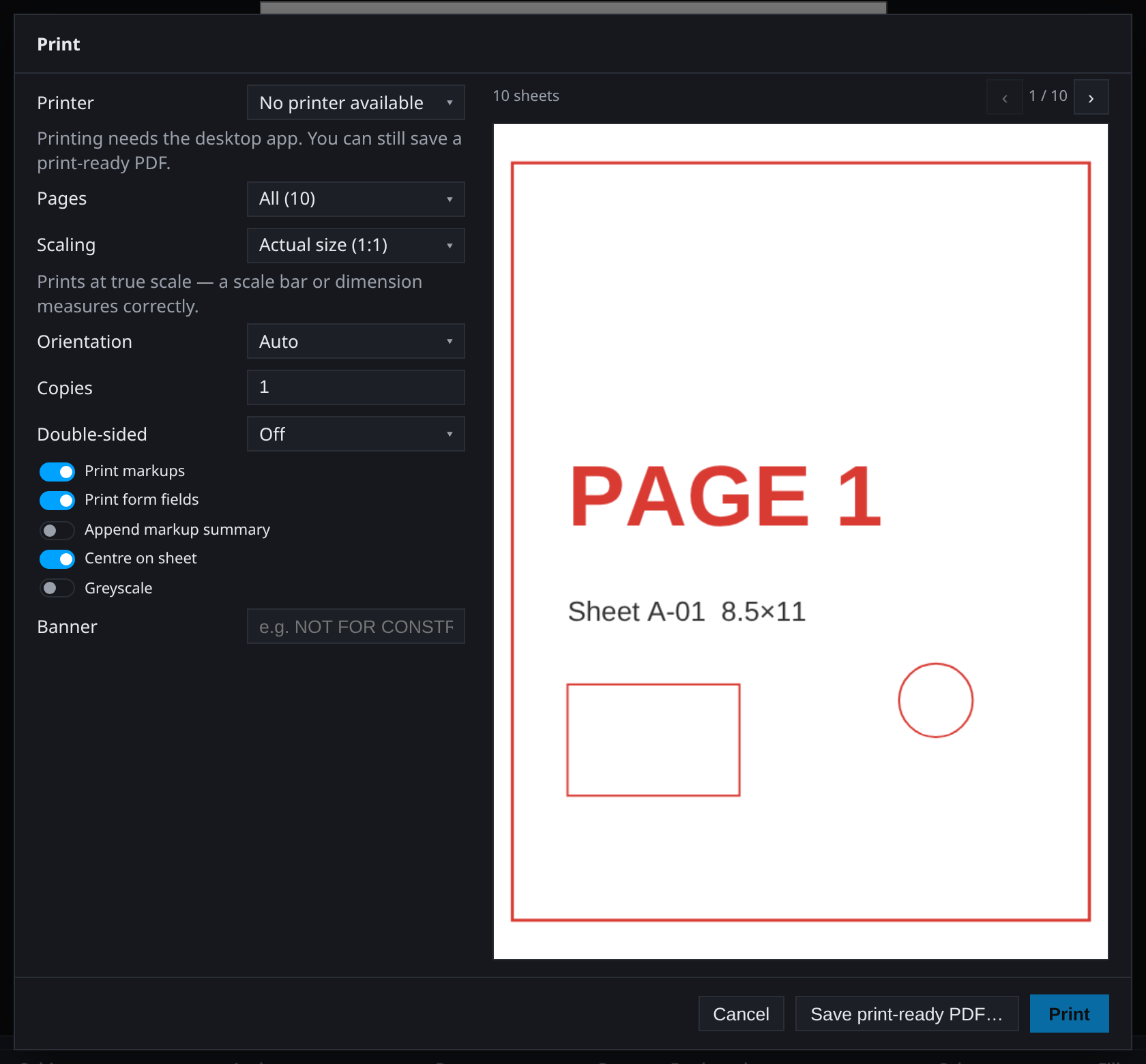
Reading the left column: Pages takes a range, Scaling defaults to actual size, Orientation follows the page unless you override it, and the toggles below decide what is composed — markups, form fields, an appended markup summary, centring, and greyscale. Banner stamps a line such as NOT FOR CONSTRUCTION across every sheet.
Two things about it matter more than the rest.
Printing is an export followed by a spool, and the preview renders the composed bytes. It therefore cannot lie about scale, range, or what a layer contributed — it is showing you the actual output, not a drawing of the settings.
Scaling defaults to actual size (1:1), not fit. Every other PDF application defaults to fit, which on a scaled construction drawing silently makes every printed dimension wrong. The 1:1 promise needs both halves — the composed bytes and telling the print system not to scale to the media — because CUPS scales by default.
Copies, collation, duplex and greyscale are passed to the driver rather than composed into the document: duplicating pages to make copies triples the spool and defeats the printer's own collator.
Windows spooling does not yet honour driver options — the shell print verb takes none — and the dialog says so up front.
Security and document integrity#
Password-protected PDFs prompt for the password on open.
Rights-managed (DRM) PDFs are refused on open, with the handler named and the remedy stated. The detector is a name lookup in the file's own encryption dictionary — no vendor SDK, no tenant, no network — and it matches any non-standard security handler rather than a hard-coded vendor name. The refusal is the feature: partially parsing a rights-protected file and rendering garbage that looks like a drawing is worse than declining it. File Properties reports the condition on its own line.
Redaction removes content rather than covering it, and sanitization strips metadata and embedded data that should not leave the office.
The .amed file format#
.amed is a SQLite database, not a bundle of JSON. That choice buys three things:
- Partial loads. The engine reads what it needs — a page's markups, a layer's contents — rather than the whole document into memory.
- Isolated tables per concern. The scene, the document, the settings and the version history live in separate tables, so one growing does not slow the others.
- Crash recovery. A background thread periodically writes a delta of what has changed since the last save into a backup file, without stuttering the UI.
An .amed file keeps every markup live and editable, together with the document it annotates. It is the working format; PDF is the exchange format.
Local version history#
Redline keeps a local, single-user version history of a document — snapshots you can compare and roll back to, offline, without a server. It is deliberately separate from the multi-user project versioning that the collaboration servers provide: they share an object model and nothing else.